
Geekflare Connect vs SimpleDraw
Side-by-side comparison to help you choose the right product.

Geekflare Connect
Unify all your AI models into one fast platform to slash costs and boost team collaboration.
Last updated: March 1, 2026

SimpleDraw
Create accurate floor plans and scale drawings instantly with our free, powerful web tool.
Last updated: March 1, 2026
Visual Comparison
Geekflare Connect
SimpleDraw
Feature Comparison
Geekflare Connect
Multi-Model Comparison
Instantly compare responses from top-tier models like GPT-5.2, Claude 4.5, and Gemini 3 side-by-side in a single query. This feature eliminates guesswork, allowing you to rapidly evaluate outputs and select the best result for your specific task, ensuring quality and efficiency with every prompt.
Collaborative Workspaces
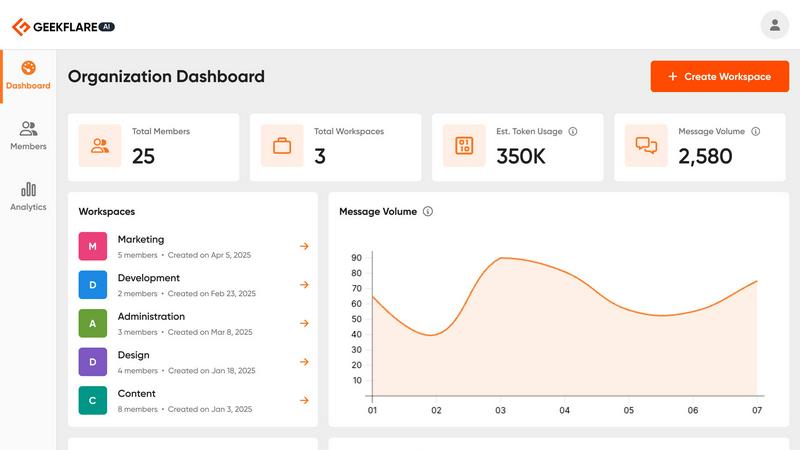
Organize chats and projects into dedicated workspaces where team members can securely share conversations, prompts, and history. This centralizes knowledge, keeps everyone aligned on projects, and eliminates the friction of scattered, individual AI accounts, dramatically speeding up collaborative workflows.
Live Web Access
Supercharge your AI interactions with real-time data. Powered by Parallel, Exa & Firecrawl, this feature gives models live web search capabilities, pulling in the latest information from the internet to generate informed, up-to-date responses without ever leaving the Connect interface.
Your Private AI Brain
Securely upload your own documents—PDFs, text files, and more—to create a private, contextual knowledge base. The AI models can then reference this data to provide precise, relevant answers, turning Connect into a powerful, customized extension of your team's expertise.
SimpleDraw
Dedicated Floor Plan Mode
This specialized mode is built for speed, allowing you to create accurate floor plans of rooms, apartments, and entire houses with zero friction. Draw walls, and add windows and doors with a single click. A comprehensive library of interior fixtures for kitchens, bathrooms, living rooms, and bedrooms lets you furnish your plans instantly. View measurements in real-time as you make adjustments, streamlining the entire design process from blank canvas to finished plan.
Smart Alignment & Snap System
Work with lightning-quick precision. The smart alignment system assists you in placing points and lines exactly where you want them. Simply point your mouse in the right area, and SimpleDraw snaps elements into place with clear visual feedback. For even greater control, use keyboard shortcuts to lock lines to vertical or horizontal axes. If you need finer control, zoom in for pixel-perfect placement, making complex drawings efficient and error-free.
Non-Destructive Editing & Complete Control
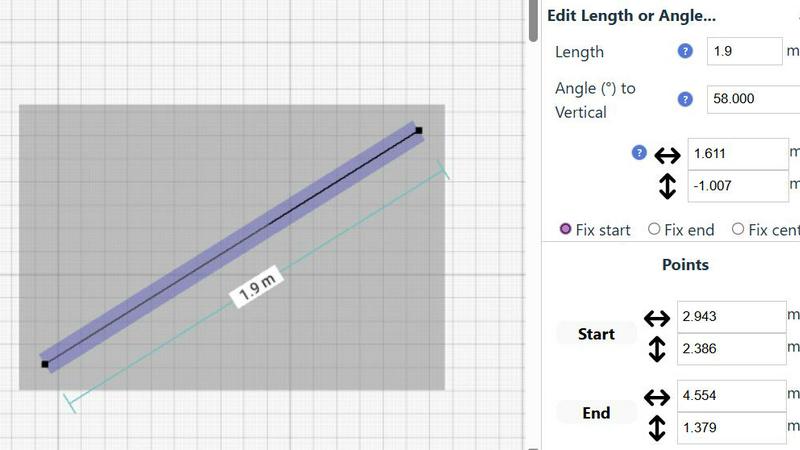
Maintain full creative freedom and speed. Every element in your drawing is 100% editable at any time, so you can iterate and refine without starting over. Use undo/redo functions (with keyboard shortcuts) to revert changes instantly. Group elements to move, copy, and paste them together, streamlining repetitive tasks. For ultimate precision, input exact positions, line lengths, and angles directly via keyboard, bypassing the mouse for rapid, accurate adjustments.
Comprehensive Measurement System
Ensure absolute accuracy with a dynamic and flexible measurement system. Contextual measurements display in real-time as you draw, helping you build to exact specifications. You have fine control over which measurements are shown and can switch seamlessly between metric and standard US units (feet and inches). This feature guarantees that every plan you create is not just a sketch, but a scale-accurate blueprint ready for action.
Use Cases
Geekflare Connect
Content Creation & Strategy
Marketing and writing teams can generate drafts, brainstorm ideas, and refine messaging at lightning speed. By comparing outputs from multiple models simultaneously, they can instantly select the most creative or brand-aligned version, streamlining the entire content production pipeline.
Technical Development & Support
Developers and SREs can use Connect to debug code, generate scripts, and troubleshoot system issues. The ability to query specialized models for different technical tasks and reference uploaded documentation in a shared workspace accelerates problem-solving and team onboarding.
Business Analysis & Research
Analysts and strategists can conduct comprehensive market research and data synthesis. Live web access provides real-time information, while multi-model comparison ensures thorough analysis from different angles, delivering robust insights faster than traditional methods.
Cross-Departmental Project Management
Project managers can centralize all AI-assisted work for a campaign or product launch in a shared workspace. Teams from sales, product, and marketing can collaborate on prompts, maintain a single source of truth, and track usage analytics to stay on budget and schedule.
SimpleDraw
Home Renovation & Room Planning
Plan your renovation projects with speed and confidence. Visualize new kitchen layouts, bathroom configurations, or living room arrangements before swinging a hammer or buying materials. Test different furniture placements instantly to see what fits, ensuring your design is both beautiful and functional from the very first step, saving you costly mistakes and time.
Creating Real Estate & Rental Listings
Generate professional, accurate floor plans for apartment listings or house sales in minutes. Quickly draft clear, scale drawings that give potential buyers or tenants a perfect understanding of the space. This fast, professional touch enhances your listing, provides better information, and can help properties stand out in a competitive market without needing expensive software or services.
DIY Project Visualization
Map out your weekend projects with absolute precision. Whether you're building a custom bookshelf, planning a garden layout, or designing a workshop, SimpleDraw lets you sketch dimensions and spatial relationships accurately. This turns abstract ideas into actionable plans quickly, ensuring you cut materials correctly the first time and execute your vision efficiently.
Interior Design & Furniture Planning
Experiment with interior design layouts at lightning speed. Arrange and rearrange furniture, fixtures, and decor within an accurate room model to find the perfect aesthetic and flow. Check clearances for walkways and ensure new purchases will fit perfectly, making design decisions fast and with total confidence before making any commitments.
Overview
About Geekflare Connect
Stop juggling AI subscriptions and wrestling with clunky interfaces. Geekflare Connect is the lightning-fast, BYOK (Bring Your Own Keys) command center engineered for modern teams to slash AI spending and supercharge collaboration. In an era of constant AI innovation, being locked into a single vendor is a recipe for inefficiency and bloated costs. Connect shatters that model by providing a unified, professional-grade workspace where your entire organization—from marketing and sales to development and support—can instantly access, compare, and collaborate using the world's best AI models like OpenAI's GPT, Google's Gemini, Anthropic's Claude, and Perplexity, all in one place. Its core value proposition delivers radical speed and efficiency: cut costs by up to 65% by consolidating usage and eliminating redundant subscriptions, gain unparalleled agility by letting teams switch to the optimal model for any task in a click, and enable seamless teamwork through shared workspaces and centralized history. For teams demanding maximum performance, financial control, and streamlined workflows from their AI tools, Geekflare Connect is the definitive, high-velocity platform.
About SimpleDraw
SimpleDraw is your instant, zero-friction gateway to professional-grade scale drawings. It's a powerful, free online tool engineered for speed and efficiency, designed for anyone who needs to create precise diagrams, floor plans, or technical sketches without the complexity of traditional CAD software. Built for the modern user, it empowers DIY enthusiasts, homeowners, interior designers, and hobbyists to visualize projects with absolute accuracy directly in their web browser. The core value proposition is unmatched simplicity: there's no software to download, no account to create, and no steep learning curve to climb. You get lightning-fast access to a focused set of intuitive tools that deliver the precision of professional software with the ease of pen and paper. From planning a complex room layout to mapping out a garden renovation, SimpleDraw transforms your ideas into accurate, scalable drawings in minutes, not hours. It’s the definitive tool for turning vision into actionable plans with speed and confidence, all from a simple browser tab.
Frequently Asked Questions
Geekflare Connect FAQ
What is BYOK (Bring Your Own Keys)?
BYOK means you provide your own API keys from AI providers like OpenAI, Anthropic, or Google. Geekflare Connect does not charge for model usage; you only pay the providers directly based on your consumption. Connect's fee is for the premium platform features that manage and optimize those keys.
How does Geekflare Connect help reduce costs?
Connect consolidates all your team's AI usage onto one platform, eliminating the need for multiple individual subscriptions. Its usage analytics provide clear visibility into spending across all models, helping you identify inefficiencies and choose the most cost-effective model for each task, potentially cutting costs by up to 65%.
Is my data and conversation history private?
Yes. Your conversations, uploaded documents, and API keys are encrypted and secure. Geekflare Connect acts as a gateway; your data is not used to train public AI models. You maintain full control and ownership over all your information within the platform.
Can I use it with my entire team?
Absolutely. Geekflare Connect is built for team collaboration. You can invite team members, organize them into projects with shared workspaces, manage access permissions, and track collective usage and costs through a unified dashboard, making it ideal for organizations of any size.
SimpleDraw FAQ
Is SimpleDraw really free to use?
Yes, SimpleDraw is completely free. There is no cost to access the core scale drawing and floor plan creation tools. You can start drawing immediately with no trial periods, subscriptions, or hidden fees. The tool is committed to providing powerful, accessible design software without financial barriers.
Do I need to download software or create an account?
No. SimpleDraw requires zero installation and no account creation. It is a 100% web-based application that runs directly in your browser. You can start a new drawing instantly by visiting the website, ensuring maximum speed and eliminating all friction to getting started.
What kind of drawings can I create with SimpleDraw?
SimpleDraw is optimized for creating precise scale drawings and floor plans. This includes detailed room layouts, complete house or apartment plans, kitchen and bathroom designs, furniture arrangements, and technical sketches for DIY projects. It provides specialized tools for architectural elements like walls, doors, and windows.
Can I use SimpleDraw on any device?
SimpleDraw is designed to work in any modern web browser on desktop or laptop computers. For the best experience with precise mouse or trackpad control for drawing, using a computer is recommended. The interface and tools are built for efficiency on these platforms.
Alternatives
Geekflare Connect Alternatives
Geekflare Connect is a unified AI platform in the productivity and management category. It centralizes access to multiple top AI models under one interface, using a BYOK model to help teams slash costs and collaborate more effectively. Users often seek alternatives for various reasons. These can include specific budget constraints, the need for different feature sets like advanced analytics or custom integrations, or a preference for a different platform approach, such as all-in-one subscriptions versus pure BYOK models. When evaluating other options, key factors to consider are multi-model support, cost transparency and control, collaboration tools for teams, and overall platform speed and reliability. The right fit depends on your team's specific workflow and financial model.
SimpleDraw Alternatives
SimpleDraw is a free, browser-based tool for creating precise scale drawings and floor plans. It belongs to the category of lightweight, accessible design software, offering professional-grade accuracy without the complexity of traditional CAD programs. Its core mission is to deliver speed and eliminate friction in the drafting process. Users often explore alternatives for various reasons. Some may require advanced features beyond basic floor plans, need offline desktop software, or seek tools integrated with specific project management ecosystems. Others might be evaluating different pricing models, as SimpleDraw's free model is a key part of its appeal. When choosing an alternative, prioritize your specific workflow needs. Consider the required precision level, the complexity of your projects, and whether you need collaboration features or platform-specific apps. The goal is to find a tool that matches your project's demands without sacrificing the efficiency and speed that tools like SimpleDraw provide.