
Facejam vs Image Pixelator Pics
Side-by-side comparison to help you choose the right product.

Facejam
Transform your selfies into stunning professional headshots in minutes with FaceJam's AI-powered photo generator.
Last updated: February 27, 2026
Image Pixelator Pics
Effortlessly turn your photos into customizable pixel art in-browser, completely free and with full privacy.
Last updated: March 1, 2026
Visual Comparison
Facejam

Image Pixelator Pics
Feature Comparison
Facejam
100+ Professional Styles
FaceJam boasts a vast library of over 100 professional styles, allowing users to find the perfect look tailored to their specific industry. From lawyers to creatives, there is a style that fits every profession, enabling users to present themselves authentically and professionally.
Realistic, High-Quality Results
The AI technology behind FaceJam ensures that the headshots generated appear incredibly realistic, mimicking the quality of images produced by professional photographers. This guarantees that users can confidently use their photos without any signs of being artificially created.
Instant Delivery
Unlike traditional photography, FaceJam provides results in just minutes. Users can skip the scheduling, commuting, and waiting associated with professional shoots, allowing for immediate use of their new headshots for LinkedIn profiles, resumes, and more.
Complete Ownership and Privacy
With FaceJam, users retain full ownership and commercial rights over their generated headshots. This means you can use your images freely for personal branding and professional purposes, all while ensuring that your uploaded photos remain private and secure.
Image Pixelator Pics
Multiple Formats Support
Image Pixelator Pics supports a variety of image formats, including JPG, PNG, and WebP. This flexibility allows users to upload and download their pixelated artwork without worrying about compatibility issues, ensuring a seamless workflow from start to finish.
Real-Time Preview
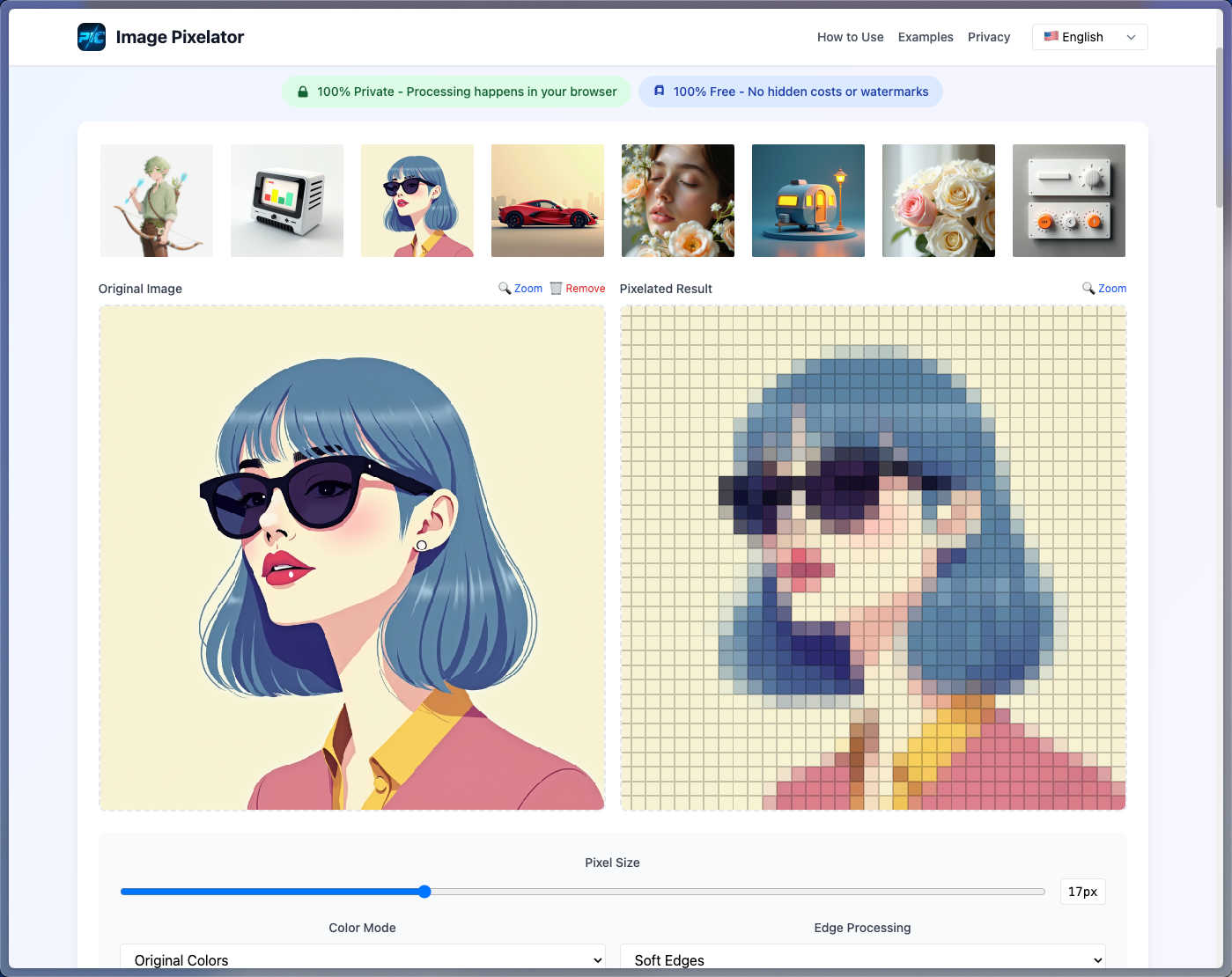
Experience instant feedback with the real-time preview feature. As you adjust pixel sizes and apply color modes, you'll see changes reflected immediately. This functionality allows for rapid experimentation, helping you fine-tune your pixel art to perfection without any delays.
100% Private Processing
Your privacy is paramount. All image processing is done in your browser, meaning no data is sent to external servers. You can create pixel art with peace of mind, knowing that your images and personal information are secure and completely confidential.
Smart Presets
Image Pixelator Pics comes equipped with smart presets that cater to various artistic styles. Whether you want to create retro 8-bit graphics, arcade-inspired artwork, or vintage effects, these built-in presets streamline your creative process, allowing for quick and easy transformations.
Use Cases
Facejam
LinkedIn Headshots
FaceJam is ideal for professionals looking to enhance their LinkedIn profiles. With just a few uploads, users can generate a standout headshot that captures their professional persona, making them more appealing to potential employers and connections.
Corporate Team Photos
Businesses can utilize FaceJam to create cohesive and polished headshots for their team members. This ensures a professional appearance on company websites, pitch decks, and internal directories, all while saving time and resources.
Personal Branding
For entrepreneurs and freelancers, maintaining a consistent and professional image across various platforms is crucial. FaceJam allows users to create high-quality photos that can be used on personal websites, social media, and portfolios, ensuring brand consistency.
Industry-Specific Needs
FaceJam caters to various industries by offering tailored looks that match specific professional standards. Whether you're in real estate, consulting, or the arts, you can find a style that resonates with your audience and enhances your credibility.
Image Pixelator Pics
Retro Game Development
Game developers can utilize Image Pixelator Pics to create game sprites and pixel art assets that evoke the classic gaming experience. This tool makes it easy to capture the nostalgic feel of retro games, enhancing the overall aesthetic of any project.
Social Media Content Creation
Social media managers and content creators can leverage pixel art for engaging posts that stand out in crowded feeds. Transforming images into pixel art can add a unique and playful touch to graphics, making them more shareable and memorable.
Artistic Projects
Digital artists can explore new creative avenues by using Image Pixelator Pics to generate pixel art for their portfolios. This tool opens up possibilities for artistic expression, allowing artists to experiment with different styles and effects seamlessly.
Merchandise Design
Entrepreneurs looking to sell merchandise can benefit from creating pixel art designs for apparel, stickers, and other products. The unique appeal of pixel art can attract customers seeking distinctive and nostalgic items, enhancing brand differentiation in the market.
Overview
About Facejam
FaceJam is an innovative AI-powered tool designed to transform your selfies into high-quality, professional headshots. This service is perfect for anyone who needs a polished image for business purposes without the hassle and expense of hiring a professional photographer. With just a few clicks, users can upload multiple photos, select from over 50 curated styles tailored for various industries, and generate stunning headshots ready for download in minutes. Whether you are a job seeker, a business professional, or a creative entrepreneur, FaceJam offers an easy and efficient way to enhance your personal branding. Say goodbye to awkward photoshoots, long waits for retouching, and hefty bills—FaceJam delivers studio-quality results directly from your device, ensuring you always look your best in any professional setting.
About Image Pixelator Pics
Image Pixelator Pics is a cutting-edge online tool that effortlessly transforms your regular images into eye-catching pixel art. Ideal for game developers, digital artists, and enthusiasts craving a retro vibe, this tool allows you to infuse nostalgia into your visuals with ease. Users can upload images in JPG, PNG, or WebP formats and customize them using a variety of pixelation settings. The interface is designed for maximum usability, making the process quick and efficient. With options for pixel size adjustments, color mode selections, and edge processing settings, you gain unparalleled control over your artistic creations. Best of all, all image processing occurs directly in your browser, ensuring complete privacy and security. Whether your goal is to create charming 8-bit graphics or vibrant pixel art, Image Pixelator Pics is the ultimate solution for transforming ordinary images into extraordinary pixel masterpieces.
Frequently Asked Questions
Facejam FAQ
How does your AI headshot generator work?
FaceJam operates in two simple steps: first, upload your selfies; second, choose your desired template. The AI then processes this information to generate realistic headshots that reflect your unique appearance.
What do you do with my uploaded photos?
Uploaded photos are exclusively used to train the AI to replicate your likeness in the generated headshots. Your images are never used to improve the AI model or shared with others, ensuring your privacy.
How many good photos can I expect?
FaceJam guarantees at least one high-quality image in every pack. The final number of quality images you receive can vary based on the selfies you provide, with many users reporting 5-10 outstanding results when following the guidelines closely.
Who owns my AI photos?
You maintain full ownership of your AI-generated photos. FaceJam grants users commercial rights, allowing for unrestricted use in personal branding, marketing, and professional applications.
Image Pixelator Pics FAQ
What is an image to pixel art converter?
An image to pixel art converter is a tool that specializes in transforming standard images into pixel art. Image Pixelator Pics uses advanced algorithms to reduce image resolution while maintaining essential visual elements, making it perfect for game assets and retro designs.
How does the pixel art maker work?
The pixel art maker processes uploaded images through a sophisticated pixelation engine. Users can adjust pixel size, select color modes, and choose edge processing options. Everything happens in-browser for maximum privacy and instant results, giving complete control over the creation process.
Is pixelating images free with this tool?
Absolutely! Image Pixelator Pics is entirely free to use, with no hidden fees or watermarks. You can pixelate images of up to 20MB without limitations, making it the best free option for turning your images into stunning pixel art.
What image formats does the pixel art converter support?
The pixel art converter supports all major image formats, including JPG, PNG, and WebP. This ensures that no matter the format of your original image, you can easily create pixel art without compromising on quality or compatibility.
Alternatives
Facejam Alternatives
Facejam is a cutting-edge AI tool designed to transform your selfies into professional-quality headshots effortlessly. Belonging to the image and photo category, it allows users to upload a few images, select from a variety of styles, and generate polished photos in minutes without the need for a photographer or extensive editing. Many users seek alternatives to Facejam due to factors such as pricing, specific feature sets, or compatibility with different platforms. When exploring alternatives, it's essential to consider aspects like the range of styles offered, the realism of the generated images, ease of use, and the overall speed of the photo generation process. Ensuring that the alternative aligns with your specific needs can significantly enhance your personal branding and professional presence.
Image Pixelator Pics Alternatives
Image Pixelator Pics is a cutting-edge online tool that allows users to effortlessly convert their images into captivating pixel art. It falls under the image and photo category, catering to game developers, digital artists, and anyone looking to add a retro flair to their visuals. Users often seek alternatives for various reasons, such as pricing constraints, different feature sets, or specific platform compatibility. Whether it’s the need for unique customization options or better performance, finding the right alternative can enhance the creative process. When choosing an alternative to Image Pixelator Pics, consider several key factors. Look for tools that support multiple image formats to ensure flexibility in your projects. Additionally, features like real-time previews can make a significant difference in the editing experience, allowing for quick adjustments and iterations. Lastly, prioritize privacy and security to maintain confidentiality, especially if you’re working on professional or sensitive projects.