
Coloring Book Engine vs Z Image Edit
Side-by-side comparison to help you choose the right product.

Coloring Book Engine
Create professional coloring books and videos fast with an all-in-one AI and local production toolkit.
Last updated: February 28, 2026

Z Image Edit
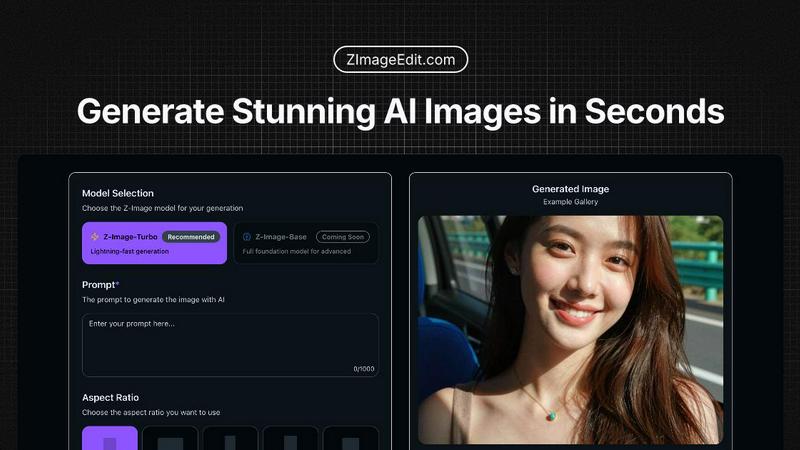
Generate stunning photorealistic AI images instantly with Z Image Edit's lightning-fast and precise editing.
Last updated: February 28, 2026
Visual Comparison
Coloring Book Engine

Z Image Edit
Feature Comparison
Coloring Book Engine
BYOK AI Integration & Local Processing
Maintain full control over your AI costs and data privacy with the Bring Your Own Key (BYOK) model. Plug in your preferred AI API keys for ideation and sketching, then let CBE's local GPU acceleration take over for the heavy lifting. The majority of tasks—from line art refinement to video generation—run directly on your computer, not in the cloud. This means faster processing, no subscription locks, and your creative assets never leave your machine.
Batch Production & Unified Workspace
Scale your catalog at lightning speed with highly optimized batch workflows. Generate multiple pages from a single concept, organize entire projects and series, and manage all your assets from one centralized workspace. This eliminates the frustrating back-and-forth between disparate tools, allowing you to efficiently transform one brilliant idea into a complete, cohesive book or even an entire product line without losing momentum.
KDP-Ready Export & Print Perfection
Export with absolute confidence. Coloring Book Engine automatically packages your work with all technical specifications handled, including proper trim sizes, margins, bleed, and single-sided pagination required by major platforms like Amazon KDP. It also features advanced tools to clean up fuzzy AI-generated lines, ensuring your final pages export with crisp, print-sharp line art that looks stunning and professional on physical paper.
Social-Ready Coloring Video Creator
Instantly create engaging promotional content to drive sales. Directly from your book files, generate captivating coloring videos and short-form clips perfectly tailored for YouTube Shorts, TikTok, and other social platforms. This built-in tool rapidly visualizes the coloring process using real-world color palettes, providing authentic previews that resonate with your audience and maximize your book's market reach without needing extra software.
Z Image Edit
Lightning-Fast Generation
Z-Image-Turbo offers lightning-fast image generation, completing tasks in sub-seconds with only 8 Neural Function Evaluations (NFEs). This incredible speed allows users to receive their images almost instantly, enhancing productivity and creativity.
Photorealistic Quality
With its exceptional image realism, Z Image Edit matches or surpasses leading competitors in visual fidelity and detail. Users can rely on the platform for high-quality outputs that meet professional standards, making it ideal for any creative project.
Bilingual Text Rendering
Z Image Edit excels in rendering both Chinese and English text flawlessly, even in complex layouts and small fonts. This feature is crucial for users working in multilingual environments or requiring detailed typographic precision in their visuals.
Advanced Image Editing Capabilities
The platform's advanced editing features allow users to make precise changes to images using natural language prompts. This intuitive approach simplifies the editing process, making it accessible to users of all skill levels.
Use Cases
Coloring Book Engine
The Solo Creator & Side Hustler
For individual artists and solopreneurs launching their first coloring book, CBE is the ultimate force multiplier. It rapidly bridges the gap from a personal sketch or AI-generated concept to a polished, commercially viable product. You can manage the entire process—planning, sketching, layout, and creating marketing videos—solo and efficiently, turning a passion project into a profitable side business without a steep learning curve or ongoing fees.
The Publishing Studio & Small Team
Small studios and publishing teams can standardize and accelerate their entire production pipeline. The Organization license allows multiple users to collaborate, while the batch workflow enables the rapid creation of series and themed collections. The tool ensures consistent, print-ready quality across all projects and empowers teams to quickly produce supplemental video assets for coordinated marketing campaigns across social media.
The Educator & Content Developer
Teachers, homeschool coordinators, and educational content developers can use CBE to swiftly create custom coloring books for classrooms, events, or digital marketplaces. The ability to work without AI allows for the integration of hand-drawn educational diagrams, while the efficient layout tools make it simple to compile themed activity books. The local processing also keeps sensitive or proprietary educational material secure.
The AI-Assisted Artist & Digital Creator
Digital artists and creators who leverage AI as part of their toolkit will find CBE indispensable. It provides a structured, fast environment to refine and enhance AI-generated sketches, clean up lines, batch-process variations, and professionally package the output. This use case perfectly combines the speed of AI ideation with the precision and control of a dedicated production engine for high-volume, high-quality output.
Z Image Edit
Graphic Design
Professional graphic designers can leverage Z Image Edit to create stunning visuals for marketing materials, social media, and branding projects. The platform's photorealistic outputs enhance the quality of their designs, saving time and effort.
Content Creation
Content creators, including bloggers and social media influencers, can use Z Image Edit to generate eye-catching images for their posts. With quick image generation, they can keep their content fresh and engaging without intensive editing.
E-commerce
Online retailers can benefit from Z Image Edit by producing high-quality product images that stand out on their websites. The ability to edit images quickly ensures that their visual content is always up-to-date and appealing.
Educational Purposes
Educators and students can utilize Z Image Edit for creating illustrations and educational materials. The platform's easy-to-use interface and advanced features promote creativity and enhance learning experiences.
Overview
About Coloring Book Engine
Coloring Book Engine (CBE) is the ultimate desktop accelerator for coloring book creators. It's a powerful, standalone design tool that slashes production time from a vague idea to a publish-ready product. This engine is built for speed, catering to individual artists, ambitious solopreneurs, publishing teams, and educators who want to build and scale a coloring book business without getting bogged down in technical hassles. Its core value is an end-to-end, locally-run workflow that puts you in full control. Forget juggling multiple subscriptions and cloud services. CBE combines AI-assisted ideation (using your own API keys to control costs) with GPU-accelerated production for coloring, layout, and video creation—all in one focused workspace. It handles the tedious specs like KDP-ready margins, bleed, and pagination, while empowering you to create marketing assets like social media coloring videos in minutes. For purists, it also supports a complete AI-free workflow. Simply put, Coloring Book Engine is your fast track to producing professional, commercial-quality books and assets, with your privacy and budget firmly intact.
About Z Image Edit
Z Image Edit is an innovative image editing platform powered by Alibaba Tongyi's advanced Z-Image models, including Z-Image-Turbo, Z-Image-Base, and Z-Image-Edit. Designed for a broad audience, from professional designers to casual users, it delivers high-quality image generation and editing capabilities. The platform emphasizes speed and efficiency, allowing users to create stunning photorealistic images and perform precise edits using natural language prompts. With a user-friendly interface, Z Image Edit eliminates the complexity often associated with image editing tools, enabling instant access from any device. Whether you are generating new visuals or refining existing images, Z Image Edit ensures exceptional results in mere seconds, making it an invaluable asset for all creative endeavors.
Frequently Asked Questions
Coloring Book Engine FAQ
Is Coloring Book Engine a subscription?
No. Coloring Book Engine is a one-time purchase for lifetime access. There is no monthly or annual subscription fee. The only potential ongoing cost is for AI API usage if you choose to use the BYOK (Bring Your Own Key) integration, which operates on a pay-as-you-go basis through your own accounts, giving you complete cost control.
Can I use this tool without AI?
Absolutely. CBE fully supports an AI-free workflow. You can import your own hand-crafted art, sketches, or any other line art, and the engine will handle all subsequent steps: organizing pages, applying print-ready formatting, creating coloring previews, and generating promotional videos. The AI features are entirely optional.
Can I use it commercially, and who owns what I create?
Yes, both the Personal and Organization licenses include commercial use rights for your own books, brands, and projects. You retain 100% ownership of all the content you create using Coloring Book Engine. The software is a tool; the intellectual property of the output belongs entirely to you.
Do I need a powerful GPU?
A modern GPU with at least 4GB of VRAM is recommended for optimal performance, especially for features like the interface rendering and previews. For the fastest local processing, particularly the experimental Local GPU Colorization, a more powerful DirectML-compatible GPU with 8GB+ VRAM (like an NVIDIA RTX 3060 or AMD Radeon RX 6600) is suggested but optional.
Z Image Edit FAQ
How does Z Image Edit generate images so quickly?
Z Image Edit utilizes the Z-Image-Turbo model, which is optimized for rapid image generation, achieving results in sub-seconds with minimal computational requirements.
Can I use Z Image Edit on any device?
Yes, Z Image Edit is designed to work seamlessly on any device, enabling users to access its features from desktops, tablets, or smartphones without any complex setup.
Is there a limit to the number of images I can generate?
Users can choose the number of outputs they want to generate, with options ranging from 1 to 4 images per prompt. Subscription plans may offer additional features and capabilities.
What languages does Z Image Edit support for prompts?
Z Image Edit supports prompts in both English and Chinese, allowing users to create images in a bilingual context effortlessly. The model understands mixed-language inputs perfectly.
Alternatives
Coloring Book Engine Alternatives
Coloring Book Engine is a powerful desktop design tool that streamlines the entire process of creating and marketing commercial coloring books. It falls into the category of specialized design software, offering a complete end-to-end workflow from initial concept to print-ready PDFs and promotional videos. Users often explore alternatives for various reasons. Some may seek different pricing models, like subscriptions versus one-time purchases. Others might need specific features, such as advanced illustration tools or different AI integrations. Platform compatibility is also a key factor, as some creators prefer cloud-based solutions over standalone desktop software. When evaluating alternatives, focus on your core needs. Consider the required output quality, the efficiency of the workflow, and the total cost of ownership. Look for tools that offer the right balance of automation for speed and control for customization, ensuring they align with your business goals and technical comfort level.
Z Image Edit Alternatives
Z Image Edit is a state-of-the-art image editing platform that falls under the categories of content creation, design tools, generative art, and image/photo editing. It leverages advanced AI technology to provide users with lightning-fast, photorealistic image generation and precise editing capabilities. Given the diverse needs of creators and designers, users often seek alternatives due to factors like pricing, feature sets, or compatibility with specific platforms. When searching for an alternative to Z Image Edit, it's crucial to consider aspects such as speed of image generation, quality of output, and the user interface's simplicity. Additionally, look for platforms that offer advanced editing features, support for various languages, and ease of use across multiple devices. These factors will help ensure that you find the right tool to meet your creative demands.