
Coloring Book Engine vs SimpleDraw
Side-by-side comparison to help you choose the right product.

Coloring Book Engine
Create professional coloring books and videos fast with an all-in-one AI and local production toolkit.
Last updated: February 28, 2026

SimpleDraw
Create accurate floor plans and scale drawings instantly with our free, powerful web tool.
Last updated: March 1, 2026
Visual Comparison
Coloring Book Engine

SimpleDraw
Feature Comparison
Coloring Book Engine
BYOK AI Integration & Local Processing
Maintain full control over your AI costs and data privacy with the Bring Your Own Key (BYOK) model. Plug in your preferred AI API keys for ideation and sketching, then let CBE's local GPU acceleration take over for the heavy lifting. The majority of tasks—from line art refinement to video generation—run directly on your computer, not in the cloud. This means faster processing, no subscription locks, and your creative assets never leave your machine.
Batch Production & Unified Workspace
Scale your catalog at lightning speed with highly optimized batch workflows. Generate multiple pages from a single concept, organize entire projects and series, and manage all your assets from one centralized workspace. This eliminates the frustrating back-and-forth between disparate tools, allowing you to efficiently transform one brilliant idea into a complete, cohesive book or even an entire product line without losing momentum.
KDP-Ready Export & Print Perfection
Export with absolute confidence. Coloring Book Engine automatically packages your work with all technical specifications handled, including proper trim sizes, margins, bleed, and single-sided pagination required by major platforms like Amazon KDP. It also features advanced tools to clean up fuzzy AI-generated lines, ensuring your final pages export with crisp, print-sharp line art that looks stunning and professional on physical paper.
Social-Ready Coloring Video Creator
Instantly create engaging promotional content to drive sales. Directly from your book files, generate captivating coloring videos and short-form clips perfectly tailored for YouTube Shorts, TikTok, and other social platforms. This built-in tool rapidly visualizes the coloring process using real-world color palettes, providing authentic previews that resonate with your audience and maximize your book's market reach without needing extra software.
SimpleDraw
Dedicated Floor Plan Mode
This specialized mode is built for speed, allowing you to create accurate floor plans of rooms, apartments, and entire houses with zero friction. Draw walls, and add windows and doors with a single click. A comprehensive library of interior fixtures for kitchens, bathrooms, living rooms, and bedrooms lets you furnish your plans instantly. View measurements in real-time as you make adjustments, streamlining the entire design process from blank canvas to finished plan.
Smart Alignment & Snap System
Work with lightning-quick precision. The smart alignment system assists you in placing points and lines exactly where you want them. Simply point your mouse in the right area, and SimpleDraw snaps elements into place with clear visual feedback. For even greater control, use keyboard shortcuts to lock lines to vertical or horizontal axes. If you need finer control, zoom in for pixel-perfect placement, making complex drawings efficient and error-free.
Non-Destructive Editing & Complete Control
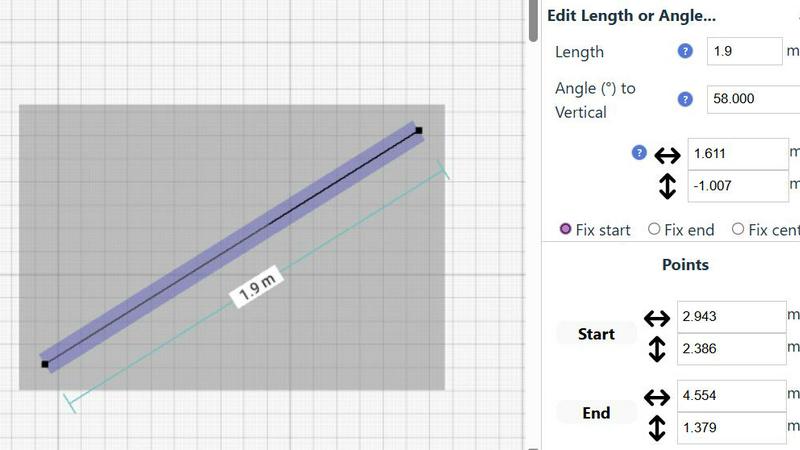
Maintain full creative freedom and speed. Every element in your drawing is 100% editable at any time, so you can iterate and refine without starting over. Use undo/redo functions (with keyboard shortcuts) to revert changes instantly. Group elements to move, copy, and paste them together, streamlining repetitive tasks. For ultimate precision, input exact positions, line lengths, and angles directly via keyboard, bypassing the mouse for rapid, accurate adjustments.
Comprehensive Measurement System
Ensure absolute accuracy with a dynamic and flexible measurement system. Contextual measurements display in real-time as you draw, helping you build to exact specifications. You have fine control over which measurements are shown and can switch seamlessly between metric and standard US units (feet and inches). This feature guarantees that every plan you create is not just a sketch, but a scale-accurate blueprint ready for action.
Use Cases
Coloring Book Engine
The Solo Creator & Side Hustler
For individual artists and solopreneurs launching their first coloring book, CBE is the ultimate force multiplier. It rapidly bridges the gap from a personal sketch or AI-generated concept to a polished, commercially viable product. You can manage the entire process—planning, sketching, layout, and creating marketing videos—solo and efficiently, turning a passion project into a profitable side business without a steep learning curve or ongoing fees.
The Publishing Studio & Small Team
Small studios and publishing teams can standardize and accelerate their entire production pipeline. The Organization license allows multiple users to collaborate, while the batch workflow enables the rapid creation of series and themed collections. The tool ensures consistent, print-ready quality across all projects and empowers teams to quickly produce supplemental video assets for coordinated marketing campaigns across social media.
The Educator & Content Developer
Teachers, homeschool coordinators, and educational content developers can use CBE to swiftly create custom coloring books for classrooms, events, or digital marketplaces. The ability to work without AI allows for the integration of hand-drawn educational diagrams, while the efficient layout tools make it simple to compile themed activity books. The local processing also keeps sensitive or proprietary educational material secure.
The AI-Assisted Artist & Digital Creator
Digital artists and creators who leverage AI as part of their toolkit will find CBE indispensable. It provides a structured, fast environment to refine and enhance AI-generated sketches, clean up lines, batch-process variations, and professionally package the output. This use case perfectly combines the speed of AI ideation with the precision and control of a dedicated production engine for high-volume, high-quality output.
SimpleDraw
Home Renovation & Room Planning
Plan your renovation projects with speed and confidence. Visualize new kitchen layouts, bathroom configurations, or living room arrangements before swinging a hammer or buying materials. Test different furniture placements instantly to see what fits, ensuring your design is both beautiful and functional from the very first step, saving you costly mistakes and time.
Creating Real Estate & Rental Listings
Generate professional, accurate floor plans for apartment listings or house sales in minutes. Quickly draft clear, scale drawings that give potential buyers or tenants a perfect understanding of the space. This fast, professional touch enhances your listing, provides better information, and can help properties stand out in a competitive market without needing expensive software or services.
DIY Project Visualization
Map out your weekend projects with absolute precision. Whether you're building a custom bookshelf, planning a garden layout, or designing a workshop, SimpleDraw lets you sketch dimensions and spatial relationships accurately. This turns abstract ideas into actionable plans quickly, ensuring you cut materials correctly the first time and execute your vision efficiently.
Interior Design & Furniture Planning
Experiment with interior design layouts at lightning speed. Arrange and rearrange furniture, fixtures, and decor within an accurate room model to find the perfect aesthetic and flow. Check clearances for walkways and ensure new purchases will fit perfectly, making design decisions fast and with total confidence before making any commitments.
Overview
About Coloring Book Engine
Coloring Book Engine (CBE) is the ultimate desktop accelerator for coloring book creators. It's a powerful, standalone design tool that slashes production time from a vague idea to a publish-ready product. This engine is built for speed, catering to individual artists, ambitious solopreneurs, publishing teams, and educators who want to build and scale a coloring book business without getting bogged down in technical hassles. Its core value is an end-to-end, locally-run workflow that puts you in full control. Forget juggling multiple subscriptions and cloud services. CBE combines AI-assisted ideation (using your own API keys to control costs) with GPU-accelerated production for coloring, layout, and video creation—all in one focused workspace. It handles the tedious specs like KDP-ready margins, bleed, and pagination, while empowering you to create marketing assets like social media coloring videos in minutes. For purists, it also supports a complete AI-free workflow. Simply put, Coloring Book Engine is your fast track to producing professional, commercial-quality books and assets, with your privacy and budget firmly intact.
About SimpleDraw
SimpleDraw is your instant, zero-friction gateway to professional-grade scale drawings. It's a powerful, free online tool engineered for speed and efficiency, designed for anyone who needs to create precise diagrams, floor plans, or technical sketches without the complexity of traditional CAD software. Built for the modern user, it empowers DIY enthusiasts, homeowners, interior designers, and hobbyists to visualize projects with absolute accuracy directly in their web browser. The core value proposition is unmatched simplicity: there's no software to download, no account to create, and no steep learning curve to climb. You get lightning-fast access to a focused set of intuitive tools that deliver the precision of professional software with the ease of pen and paper. From planning a complex room layout to mapping out a garden renovation, SimpleDraw transforms your ideas into accurate, scalable drawings in minutes, not hours. It’s the definitive tool for turning vision into actionable plans with speed and confidence, all from a simple browser tab.
Frequently Asked Questions
Coloring Book Engine FAQ
Is Coloring Book Engine a subscription?
No. Coloring Book Engine is a one-time purchase for lifetime access. There is no monthly or annual subscription fee. The only potential ongoing cost is for AI API usage if you choose to use the BYOK (Bring Your Own Key) integration, which operates on a pay-as-you-go basis through your own accounts, giving you complete cost control.
Can I use this tool without AI?
Absolutely. CBE fully supports an AI-free workflow. You can import your own hand-crafted art, sketches, or any other line art, and the engine will handle all subsequent steps: organizing pages, applying print-ready formatting, creating coloring previews, and generating promotional videos. The AI features are entirely optional.
Can I use it commercially, and who owns what I create?
Yes, both the Personal and Organization licenses include commercial use rights for your own books, brands, and projects. You retain 100% ownership of all the content you create using Coloring Book Engine. The software is a tool; the intellectual property of the output belongs entirely to you.
Do I need a powerful GPU?
A modern GPU with at least 4GB of VRAM is recommended for optimal performance, especially for features like the interface rendering and previews. For the fastest local processing, particularly the experimental Local GPU Colorization, a more powerful DirectML-compatible GPU with 8GB+ VRAM (like an NVIDIA RTX 3060 or AMD Radeon RX 6600) is suggested but optional.
SimpleDraw FAQ
Is SimpleDraw really free to use?
Yes, SimpleDraw is completely free. There is no cost to access the core scale drawing and floor plan creation tools. You can start drawing immediately with no trial periods, subscriptions, or hidden fees. The tool is committed to providing powerful, accessible design software without financial barriers.
Do I need to download software or create an account?
No. SimpleDraw requires zero installation and no account creation. It is a 100% web-based application that runs directly in your browser. You can start a new drawing instantly by visiting the website, ensuring maximum speed and eliminating all friction to getting started.
What kind of drawings can I create with SimpleDraw?
SimpleDraw is optimized for creating precise scale drawings and floor plans. This includes detailed room layouts, complete house or apartment plans, kitchen and bathroom designs, furniture arrangements, and technical sketches for DIY projects. It provides specialized tools for architectural elements like walls, doors, and windows.
Can I use SimpleDraw on any device?
SimpleDraw is designed to work in any modern web browser on desktop or laptop computers. For the best experience with precise mouse or trackpad control for drawing, using a computer is recommended. The interface and tools are built for efficiency on these platforms.
Alternatives
Coloring Book Engine Alternatives
Coloring Book Engine is a powerful desktop design tool that streamlines the entire process of creating and marketing commercial coloring books. It falls into the category of specialized design software, offering a complete end-to-end workflow from initial concept to print-ready PDFs and promotional videos. Users often explore alternatives for various reasons. Some may seek different pricing models, like subscriptions versus one-time purchases. Others might need specific features, such as advanced illustration tools or different AI integrations. Platform compatibility is also a key factor, as some creators prefer cloud-based solutions over standalone desktop software. When evaluating alternatives, focus on your core needs. Consider the required output quality, the efficiency of the workflow, and the total cost of ownership. Look for tools that offer the right balance of automation for speed and control for customization, ensuring they align with your business goals and technical comfort level.
SimpleDraw Alternatives
SimpleDraw is a free, browser-based tool for creating precise scale drawings and floor plans. It belongs to the category of lightweight, accessible design software, offering professional-grade accuracy without the complexity of traditional CAD programs. Its core mission is to deliver speed and eliminate friction in the drafting process. Users often explore alternatives for various reasons. Some may require advanced features beyond basic floor plans, need offline desktop software, or seek tools integrated with specific project management ecosystems. Others might be evaluating different pricing models, as SimpleDraw's free model is a key part of its appeal. When choosing an alternative, prioritize your specific workflow needs. Consider the required precision level, the complexity of your projects, and whether you need collaboration features or platform-specific apps. The goal is to find a tool that matches your project's demands without sacrificing the efficiency and speed that tools like SimpleDraw provide.