
Blueberry vs Shrinkpad
Side-by-side comparison to help you choose the right product.

Blueberry
Blueberry is an all-in-one Mac app that streamlines coding, terminal tasks, and browsing for efficient web app.
Last updated: February 27, 2026

Shrinkpad
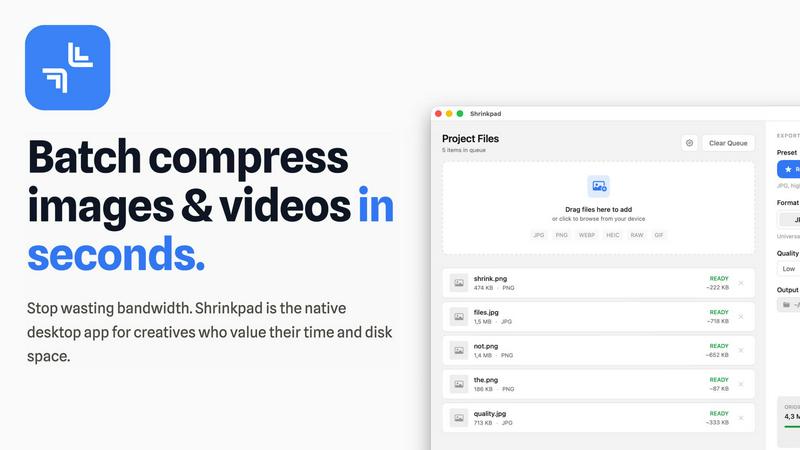
Shrinkpad instantly compresses batches of images and videos on your Mac to save space and time.
Last updated: February 28, 2026
Visual Comparison
Blueberry

Shrinkpad
Feature Comparison
Blueberry
Unified Workspace
Blueberry provides an integrated environment where your terminal, code editor, and preview browser coexist harmoniously. This eliminates the need for switching between applications, allowing you to focus solely on your product development tasks.
Multi-Context AI Integration
The built-in MCP server allows AI models to access and interact with your entire workspace in real-time. This means your AI can understand your code, browser previews, and terminal outputs, providing context-aware assistance that’s truly invaluable.
Pinned Apps Functionality
Keep essential tools like GitHub, Figma, and Linear docked within your workspace. These pinned apps not only load with your project but also share live context with your AI, making collaboration smoother and more efficient.
Advanced Code Editing Features
Blueberry offers a powerful code editor equipped with full syntax highlighting, multi-cursor support, and robust git integration. This editor is designed to provide a seamless coding experience while feeding valuable context to your AI, enhancing its capabilities.
Shrinkpad
Lightning-Fast Batch Processing
Stop processing files one by one. Shrinkpad is engineered for speed, leveraging multi-threaded compression and optimization for Apple Silicon to process thousands of images and videos in minutes. Drop an entire folder and watch as it instantly detects and queues all media files, ready for bulk compression with a single click. This massive time savings is a game-changer for handling large projects.
Intelligent Quality Optimization
No more guessing at compression settings. Shrinkpad automatically analyzes the visual complexity of each file to apply the perfect compression ratio. Its smart algorithms ensure maximum file size reduction without introducing artifacts or noticeable quality loss, delivering optimized assets that look perfect every time, automatically.
Complete Local Privacy & Security
Your files stay on your machine, period. Unlike web-based tools, Shrinkpad performs all compression locally using native macOS frameworks. This means your original high-resolution assets, client work, and sensitive projects are never uploaded to a cloud server, ensuring total privacy and security throughout your workflow.
Advanced Format & Workflow Support
Shrinkpad handles over 50 formats effortlessly, from common JPGs and PNGs to professional RAW files, HEIC, WEBP, AVIF, MP4, and MOV videos. It includes pro features like automatic file renaming, metadata stripping, and subfolder preservation. Export assets at 2x/4x from design tools and let Shrinkpad optimize and organize them in one fell swoop.
Use Cases
Blueberry
Rapid Prototyping
Developers can quickly build and test web applications without the hassle of window management. With everything in one place, rapid prototyping becomes a breeze, allowing for faster iterations and feedback cycles.
Collaborative Development
Teams can work together in real-time by utilizing Blueberry's pinned apps and multi-context AI. This feature fosters collaboration by keeping everyone updated on project changes and insights, all within a shared workspace.
Enhanced Learning Environment
For students and newcomers to programming, Blueberry acts as a comprehensive learning tool. The live context features help users understand code behavior and AI responses, making the learning process more interactive and informative.
Context-Driven Debugging
Debugging becomes more efficient with Blueberry's ability to provide real-time insights. Developers can see terminal outputs and code changes simultaneously, allowing for quicker identification and resolution of issues.
Shrinkpad
Optimizing Website & App Assets
Developers and web designers can drastically reduce bundle sizes and improve load times. By batch-compressing hero images, icons, and promotional videos, Shrinkpad helps achieve faster Lighthouse Performance scores (like LCP) and enhances user experience without manual, per-file optimization.
Managing Photographer & Creator Libraries
Photographers and content creators drowning in large RAW files and 4K video footage can reclaim terabytes of storage. Shrinkpad processes entire shoots or content batches in one go, preparing files for client delivery, portfolio sites, or archiving while maintaining professional quality and saving enormous amounts of time.
Streamlining Design-to-Export Workflows
Designers using Figma, Photoshop, or Sketch can export all assets at high resolutions for various devices and then use Shrinkpad for final optimization. It automatically compresses and renames batches of files, eliminating the tedious, manual step of exporting individually optimized versions.
Preparing Files for Email & Collaboration
Professionals who need to send large batches of images or videos via email or collaboration platforms can use Shrinkpad to quickly reduce file sizes before sharing. This avoids hitting attachment limits, speeds up upload/download times, and ensures recipients get optimized files instantly.
Overview
About Blueberry
Blueberry is an innovative macOS application designed for modern product builders who want to streamline their development process. It combines your code editor, terminal, and browser into a single, focused workspace, eliminating the chaos of juggling multiple windows. The primary value proposition of Blueberry lies in its ability to enhance productivity by allowing developers to build and ship web applications seamlessly. By integrating powerful AI models like Claude, Gemini, and Codex through the Blueberry MCP (Multi-Context Platform), users can gain live insights into their projects. With Blueberry, you can stop the tedious practice of copy-pasting context and instead let your AI see everything it needs to enhance your coding experience. Whether you are a solo developer or part of a team, Blueberry is tailored to accelerate your workflow and foster innovation.
About Shrinkpad
Shrinkpad is the ultimate batch compression powerhouse built exclusively for macOS. It slashes through the tedious work of optimizing images and videos, delivering lightning-fast results without sacrificing quality. Designed for photographers, designers, developers, and content creators, it transforms hours of manual busywork into a task that takes seconds. Simply drag and drop hundreds of files or entire folders, and Shrinkpad compresses them in a flash, reducing sizes by up to 90% while preserving visual integrity. Every operation happens locally on your Mac using native Apple frameworks, guaranteeing complete privacy—your files never touch the cloud. With seamless support for over 50 formats, including RAW photos and 4K videos, Shrinkpad is the essential tool for reclaiming disk space, speeding up websites, and streamlining your entire media workflow with unmatched efficiency.
Frequently Asked Questions
Blueberry FAQ
What is Blueberry?
Blueberry is a macOS application that integrates your code editor, terminal, and browser into a single workspace, enhancing productivity for developers building web applications.
How does Blueberry support AI models?
Blueberry features a built-in MCP server that allows AI models like Claude, Gemini, and Codex to access and interact with your entire workspace, providing real-time context for improved assistance.
Is Blueberry free to use?
Yes, Blueberry is currently in a free beta phase, allowing users to take advantage of its features without any cost during this period.
What operating system does Blueberry support?
Blueberry is exclusively designed for macOS, ensuring optimized performance and functionality for Mac users.
Shrinkpad FAQ
What file formats does Shrinkpad support?
Shrinkpad supports a wide range of over 50 image and video formats. This includes common formats like JPG, PNG, GIF, and MP4, as well as professional formats like RAW camera files (from Canon, Nikon, Sony, etc.), HEIC, WEBP, AVIF, ProRes, and MOV. It handles mixed batches of photos and videos seamlessly.
Does Shrinkpad support video compression?
Yes, absolutely. Shrinkpad provides powerful video compression alongside image optimization. It can compress large video files (including 4K footage) by significant percentages, reducing their size for easier storage, sharing, or web use while maintaining a high-quality visual output.
How many files can I process at once?
With the paid Personal or Team plans, you get unlimited batch processing. You can queue and process thousands of files in a single session without crashes. The Free Starter plan has a limit of 10 files per batch for initial testing.
Are my files uploaded to the cloud?
No. Privacy is a core principle of Shrinkpad. All processing is performed 100% locally on your Mac using Apple's native frameworks. Your original files, compressed results, and any data never leave your computer, ensuring complete security and privacy.
Alternatives
Blueberry Alternatives
Blueberry is a Mac app that seamlessly integrates your editor, terminal, and browser into a single, efficient workspace. This innovative tool caters primarily to developers, enabling them to connect powerful AI models like Claude, Gemini, and Codex, allowing for enhanced productivity without the hassle of switching between various applications. Users often seek alternatives to Blueberry for a variety of reasons, including pricing constraints, specific feature requirements, or compatibility with different operating systems. When exploring alternatives, consider factors such as user interface, integration capabilities, and the overall efficiency of the tool in streamlining your development workflow. The right choice will ultimately depend on your unique needs and preferences.
Shrinkpad Alternatives
Shrinkpad is a powerful batch compression tool for macOS, squarely in the image and video optimization category. It excels at slashing file sizes locally and at lightning speed, making it a favorite for Mac users who prioritize efficiency and privacy. Users often explore alternatives for various reasons. Some may need a tool that works across Windows or online platforms, while others might seek different pricing models or specific advanced features not present in their current solution. The quest for the perfect fit is common in any software category. When evaluating an alternative, key factors to consider are processing speed, format support, and whether it operates locally or in the cloud. Your ideal choice should match your platform, respect your budget, and deliver the quality control you need without slowing down your creative workflow.