
BlitzCut vs SeeDance Ai
Side-by-side comparison to help you choose the right product.

BlitzCut
BlitzCut is an AI video editor that instantly removes silence and adds captions, transforming clips into shareable.
Last updated: February 27, 2026

Seedance AI instantly generates polished, sound-synced videos from your text, images, audio, or video inputs.
Last updated: April 13, 2026
Visual Comparison
BlitzCut

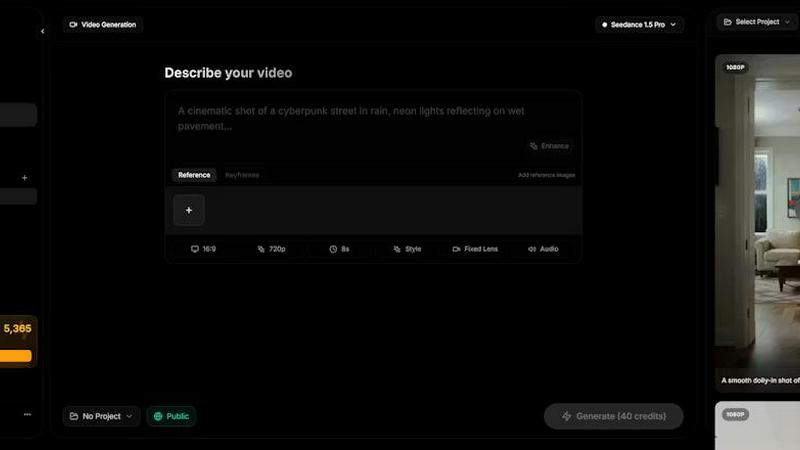
SeeDance Ai
Feature Comparison
BlitzCut
Automatic Silence Removal
BlitzCut's Automatic Silence Removal feature utilizes advanced AI to detect and eliminate silent gaps in your video. This ensures a smooth and engaging viewing experience without the awkward pauses that can disrupt the flow. In just 30 seconds, users can have a polished video ready for posting, saving them a significant amount of time compared to traditional editing methods.
AI Captions
The AI Captions feature provides over 95% accuracy in transcribing and styling captions, making your videos more accessible and engaging. With various viral styles available, creators can easily add eye-catching text overlays that enhance the viewing experience and attract more viewers on social media platforms. This feature guarantees that your message is conveyed clearly and stylishly.
Text-Based Editing
BlitzCut introduces Text-Based Editing, allowing creators to edit their videos by simply deleting sentences from the transcription. This intuitive approach transforms video editing into a text-based task, making it easier for users to cut unnecessary content and focus on the key points they want to convey, all without the hassle of traditional editing interfaces.
Mobile-First Design
BlitzCut is built with a mobile-first approach, ensuring that users can edit videos seamlessly on their iPhones, iPads, and Macs. This design optimizes the user experience for mobile devices, allowing creators to import, edit, and export videos directly from their phones in under two minutes. The convenience of mobile editing means creators can work from anywhere, anytime.
SeeDance Ai
Multimodal @ Reference System
Ditch the guesswork of written prompts. Upload up to 12 reference files (images, videos, audio) and tag them directly in your prompt using @ symbols. This system treats assets like @Image1 or @Video1 as precise instructions, allowing you to combine a specific face, camera move, and audio beat into one coherent generation. It transforms loose inspiration into exact, controllable commands for faster, more accurate creation.
Native Audio-Visual Synchronization
SeeDance Ai generates audio and video together in the same model pass, eliminating post-production layering. This ensures exact timing where footsteps hit on the beat, sound effects land on the correct frame, and lip-sync is flawless across cuts. The model natively produces environmental audio, background music, and character dialogue, making synchronized sound a default feature, not an afterthought.
Consistent Character & Object Integrity
Eliminate character drift for good. SeeDance Ai uses a cross-attention reference system to lock in facial geometry, clothing details, and style across different scenes and shots. This ensures the same character, logo, or product appears with sharp, legible consistency throughout a video, which is essential for serialized content, branded campaigns, and professional storytelling.
Precise Motion & Camera Control
Replicate complex movements with high fidelity. By uploading a reference video, you can direct SeeDance Ai to copy exact camera behaviors—like dolly zooms, tracking shots, or handheld shake. The same applies to human motion, allowing you to transfer intricate dance choreography or martial arts sequences from a reference clip to your generated characters with stunning accuracy and smooth physics.
Use Cases
BlitzCut
Fast Social Media Posting
BlitzCut is perfect for content creators who need to post frequently on social media. With its quick editing capabilities, users can transform raw footage into engaging videos in under two minutes, making daily posting not just feasible but easy and efficient.
Influencer Content Creation
Influencers can leverage BlitzCut to produce high-quality videos quickly, enhancing their content strategy. The AI-driven features streamline the editing process, allowing them to focus on crafting unique narratives rather than getting bogged down by technical edits.
Educational Video Production
Educators and trainers can use BlitzCut to create informative video content rapidly. By removing silences and adding accurate captions, they can ensure their lessons are clear and engaging, keeping students' attention while delivering valuable information.
Marketing and Promotion
Businesses looking to promote their products or services can benefit from BlitzCut's fast editing features. By creating polished promotional videos quickly, they can respond to market trends and customer feedback with agility, ensuring they stay relevant and competitive.
SeeDance Ai
Viral Social Media & Marketing Clips
Generate eye-catching, platform-ready content at lightning speed. Create product demos, promotional teasers, and branded story clips with consistent logos and characters. The native audio sync and multi-shot sequencing allow for producing polished ads and social posts that capture attention and drive engagement without a studio or lengthy edit.
Dynamic Dance & Choreography Videos
Perfect for choreographers and dancers to visualize routines. Upload a reference video of a dance move, and apply it to generated characters in any environment. The advanced motion-transfer respects physics and skeletal integrity, producing smooth, realistic dance videos ideal for tutorials, promotional content, or creative exploration.
Cinematic Storytelling & Short Films
Automate your production pipeline for narrative projects. Input a detailed script-like prompt, and SeeDance Ai intelligently breaks it into a sequence of distinct, connected shots with consistent characters and synchronized dialogue. This enables rapid prototyping of scenes, storyboards, and even complete short films with director-level control over camera work and pacing.
Engaging Educational & Explainer Content
Produce high-quality educational videos efficiently. Explain complex concepts with custom-generated visuals, smooth animations, and clear, synchronized narration. The ability to maintain object and text consistency makes it ideal for creating tutorial series, product explainers, and training materials where visual coherence is critical.
Overview
About BlitzCut
BlitzCut is an innovative AI-powered video editing tool designed to revolutionize how content creators produce and share their videos. With a focus on speed and efficiency, BlitzCut allows users to edit videos for social media platforms like TikTok, Instagram Reels, and YouTube Shorts in a matter of minutes. It automates tedious tasks such as silence removal and captioning, enabling creators to spend less time editing and more time crafting engaging content. Designed for mobile devices, BlitzCut is perfect for on-the-go creators who need a powerful yet accessible editing solution. By streamlining the editing process and providing high-quality outputs, BlitzCut empowers users to post daily, significantly enhancing their online presence without the burden of extensive editing sessions.
About SeeDance Ai
SeeDance Ai is a cutting-edge, multimodal AI video generation platform engineered for speed and cinematic quality. It transforms simple inputs—text, images, audio, and video references—into polished, multi-shot videos with synchronized sound in a single, lightning-fast generation pass. This tool is built for professional creators, marketers, and storytellers who need high-fidelity output without the anatomical drift, flickering, and inconsistent physics that plague other AI video tools. Its core value proposition is director-level control, offering an automated production pipeline that handles complex cinematography, character consistency, motion physics, and native audio-visual sync simultaneously. By leveraging advanced models like SeeDance 2.0, it ensures skeletal integrity and 100% character identity consistency across shots, making it the specialized hub for creating marketing clips, social content, dance videos, and narrative storytelling with unprecedented efficiency and realism.
Frequently Asked Questions
BlitzCut FAQ
How does BlitzCut's AI silence removal work?
BlitzCut uses advanced AI algorithms to analyze your video and detect silent gaps. Once identified, the AI automatically removes these pauses, allowing for a seamless viewing experience without any manual effort required from the user.
Can I use BlitzCut without creating an account?
Yes! BlitzCut is designed for ease of use and allows users to download and start editing videos without needing to create an account, making it incredibly accessible for everyone.
What devices is BlitzCut available on?
BlitzCut is available as a mobile application for iPhone and iPad, as well as a desktop version for Mac. This mobile-first design ensures that users can edit videos conveniently from their preferred device.
How accurate are the auto-generated captions?
BlitzCut's AI Captions feature boasts over 95% accuracy in transcription and caption styling. This high level of accuracy ensures that your videos are not only engaging but also accessible to a broader audience.
SeeDance Ai FAQ
What makes SeeDance Ai different from other AI video generators?
SeeDance Ai stands out with its true multimodal generation and native audio-visual sync. While others treat audio as a separate step, SeeDance generates sound and picture together for perfect timing. Its @ reference system offers unparalleled control, and its focus on motion physics and character consistency solves common issues like anatomical drift and flickering, delivering cinematic quality faster.
Can I use my own images and videos to guide the generation?
Absolutely. The core of SeeDance Ai is its multimodal @ reference system. You can upload up to 9 images, 3 videos, and 3 audio clips as references. By tagging these assets in your prompt (e.g., "a person with the face from @Image1 dancing like in @Video1"), you provide the model with exact visual and motion blueprints to follow, ensuring your creative vision is accurately realized.
Is SeeDance Ai suitable for creating long-form content?
SeeDance Ai excels at generating coherent, multi-shot sequences from a single prompt, making it powerful for short-form content like clips, ads, and scenes. For longer narratives, it is ideal for rapidly producing key scenes or segments. Creating a full long-form video would involve generating and editing multiple coherent sequences together, leveraging its consistency features.
How does the pricing work? Is there a free trial?
The provided content indicates you can start generating videos with no credit card required, suggesting an accessible free tier or trial period exists to test the platform's capabilities. For detailed information on specific plans, tiers, and costs, visiting the official seedanceai.com website is recommended to get the latest and most accurate pricing details.
Alternatives
BlitzCut Alternatives
BlitzCut is an AI-powered video editing tool designed to streamline the content creation process, particularly for social media. It excels in automating tedious tasks like silence removal and caption creation, making it a go-to choice for creators aiming to produce engaging videos quickly. However, users often seek alternatives due to various factors such as pricing, specific features, or compatibility with different platforms. Finding the right alternative involves assessing aspects like ease of use, editing speed, and the ability to meet unique content creation needs. When exploring alternatives, consider the workflow efficiency and how well the tool integrates into your existing setup. Look for options that prioritize mobile accessibility, as many creators rely on their devices for editing on-the-go. Additionally, evaluate the level of automation offered, ensuring that it enhances creativity rather than stifling it.
SeeDance Ai Alternatives
SeeDance Ai is a specialized AI video generation platform focused on creating cinematic, multi-shot videos from text, images, audio, and video inputs. It belongs to the professional AI cinematography category, prioritizing high-fidelity motion, physics, and identity consistency. Users often explore alternatives for various reasons. These can include budget constraints, specific feature requirements not covered by a single tool, or the need for a different platform or workflow integration. The search for the right tool is about finding the perfect fit for a project's unique demands. When evaluating alternatives, key factors to consider are output quality, especially regarding realistic motion and anatomical accuracy, the level of creative control offered, pricing structure, and the overall speed and efficiency of the generation process. The goal is to match a tool's strengths directly to your content creation needs.