
AI Formatter vs Zovo
Side-by-side comparison to help you choose the right product.
AI Formatter
Instantly format raw text into polished professional documents for free.
Last updated: March 1, 2026

Zovo offers 20 privacy-first Chrome extensions for developers and writers, all from a single solo developer.
Last updated: February 27, 2026
Visual Comparison
AI Formatter
Zovo

Feature Comparison
AI Formatter
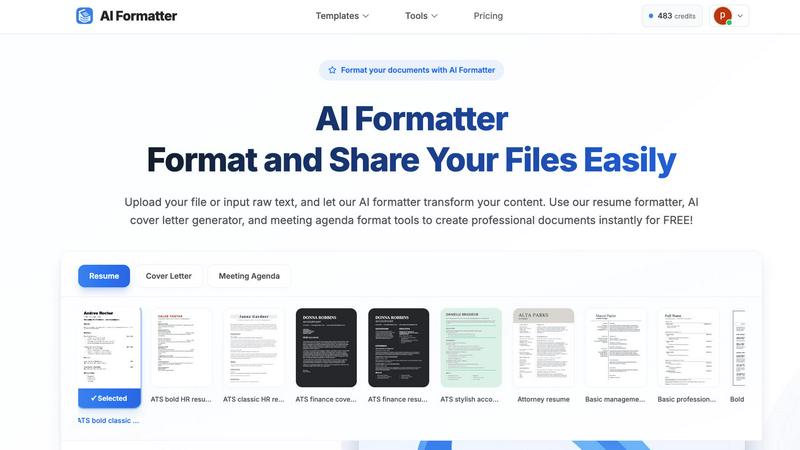
AI-Powered Instant Formatting
Harness advanced AI technology that analyzes your raw text or uploaded document and applies perfect professional formatting in seconds. The AI understands context and structure, intelligently organizing content into clean, visually appealing layouts without any manual effort. Simply upload or paste your text, and watch the transformation happen at lightning speed.
Vast ATS-Optimized Template Library
Access a curated collection of over 162 professional templates designed specifically to pass Automated Tracking Systems and impress recruiters. The library includes ATS-friendly resume formats, compelling cover letter designs, structured meeting agendas, professional invoices, and more, giving you a powerful head start on any document type.
Real-Time Collaborative Editor
Customize your AI-formatted document instantly with a powerful, intuitive online editor. Adjust fonts, colors, spacing, and layouts on the fly with real-time preview. This feature allows for complete personalization and fine-tuning, ensuring the final document matches your exact brand and style preferences without leaving the platform.
Multi-Format Export & Secure Sharing
Download your perfected documents in the formats you need most, including Word, PDF, and plain text. Share documents securely directly from the platform via shareable links. This versatility ensures compatibility with any application process or professional requirement, making distribution and collaboration efficient and hassle-free.
Zovo
BeLikeNative
BeLikeNative enables users to write fluently in 80 languages with one keystroke. This flagship extension instantly rewrites your text, ensuring that you communicate like a native speaker. Ideal for writers, students, and professionals looking to enhance their language skills, this tool supports seamless integration across all writing platforms.
Tab Suspender Pro
Tab Suspender Pro intelligently manages your browser's memory usage by automatically suspending inactive tabs. This feature helps improve performance by reducing memory strain, making it perfect for users who tend to keep multiple tabs open while working or browsing. It offers memory tracking and smart detection for optimal efficiency.
Clipboard History Pro
Clipboard History Pro ensures that you never lose track of your copied text again. This extension stores up to 10,000 clips and features an instant search functionality for quick retrieval. Perfect for researchers, writers, and anyone who frequently copies and pastes, it simplifies the management of copied content.
Form Filler Pro
Form Filler Pro allows users to fill forms with a single click using saved profiles. This feature saves time and eliminates repetitive typing, making it ideal for users who frequently complete online forms. It supports multiple profiles and ensures that your data remains 100% local and secure.
Use Cases
AI Formatter
Job Application Preparation
Job seekers can upload an existing resume or raw career history and use the AI resume formatter to create an ATS-optimized resume in under a minute. Simultaneously, the AI cover letter generator crafts a personalized, compelling cover letter, drastically speeding up application cycles and significantly improving interview callback rates with a 95%+ ATS pass guarantee.
Professional Meeting Management
Professionals can quickly transform scattered notes or bullet points into a clear, structured meeting agenda format. This ensures every meeting has a professional outline, defined objectives, and a timed schedule, promoting productivity and accountability. Share the formatted agenda instantly with all participants directly from the platform.
Business Document Creation
Entrepreneurs, freelancers, and small business owners can generate polished invoices, receipts, and proposals in seconds. Input client details and service data, and the AI invoice generator formats it into a clean, brand-consistent document ready for sending, streamlining billing and administrative tasks to save valuable time.
Academic and Report Formatting
Students, researchers, and academics can format essays, reports, and project documents to meet specific style guidelines quickly. By uploading a draft text file, the AI applies consistent headings, margins, citations, and layout, allowing the user to focus on content quality rather than tedious formatting rules.
Zovo
Academic Writing
Students and researchers can leverage BeLikeNative to enhance their academic writing. By utilizing its one-keystroke rewrite feature, they can improve clarity and fluency, ensuring their papers meet high standards of academic integrity and communication.
Web Development
Web developers can benefit from the JSON Formatter Pro and Regex Tester Pro extensions. These tools enable them to format, validate, and debug JSON data seamlessly, enhancing their productivity and helping them avoid common coding pitfalls.
Content Creation
Content creators can streamline their workflow with Clipboard History Pro and Form Filler Pro. These tools provide quick access to previously copied text and allow for rapid form completion, making it easier to focus on creativity without getting bogged down by repetitive tasks.
Data Analysis
Data analysts can utilize Web Scraper Lite and Tab Suspender Pro to efficiently gather and manage data from multiple sources. The visual selector in Web Scraper Lite allows for easy data extraction, while Tab Suspender Pro optimizes their browser's performance, ensuring smooth multitasking.
Overview
About AI Formatter
AI Formatter is a lightning-fast, cloud-based document formatting platform engineered to eliminate the tedious hours spent on manual document design. Developed by Sun Sky LLC, it leverages cutting-edge artificial intelligence to transform raw text or uploaded files—including Word documents, PDFs, and TXT files—into professionally polished documents in mere seconds. It’s the ultimate productivity tool for job seekers, professionals, businesses, and academics who need to present their best work instantly. The core value proposition is staggering speed paired with intelligent, ATS-optimized output. With a proven Applicant Tracking System pass rate of over 95%, it ensures your resume gets seen by human eyes. Choose from an extensive library of over 100 professionally designed templates for resumes, cover letters, meeting agendas, invoices, and more. The integrated real-time editor allows for complete customization of fonts, colors, and layouts. Finally, export or securely share your documents in multiple formats. Starting with free credits, AI Formatter streamlines document creation from start to finish, guaranteeing you save time and boost your professional impact with every interaction.
About Zovo
Zovo is a comprehensive suite of 20 powerful Chrome extensions developed by a solo developer with over a decade of experience and a proven track record of more than $400K earned on Upwork with a 100% success rate. Tailored for users who value efficiency, privacy, and customization, Zovo's flagship extension, BeLikeNative, revolutionizes writing by enabling over 3,300 users to express themselves like native speakers in 80 different languages with a simple keystroke. The suite includes essential tools like Tab Suspender Pro for memory management, JSON Formatter Pro for data handling, and Clipboard History Pro for seamless text management. Every extension prioritizes user privacy, ensuring that data never leaves your device, with no data harvesting or corporate interference. Users actively participate in shaping the development roadmap by voting on features, making Zovo a community-driven platform where your needs dictate the evolution of the tools you rely on. Experience monthly updates and the excitement of early access for members, while a selection of tools is available for free online at zovo.one.
Frequently Asked Questions
AI Formatter FAQ
What file formats does AI Formatter support for upload?
AI Formatter supports a wide range of common document formats for upload, including PDF, DOC, DOCX, and TXT files. This ensures you can start from almost any existing document. The maximum file size for uploads is 10MB, which is sufficient for most standard professional and academic documents.
How does the ATS optimization for resumes work?
The platform's templates and AI engine are specifically designed with Applicant Tracking System compatibility in mind. This includes using clean, parsable layouts, standard section headings, and optimized keyword placement. This design results in a documented pass rate of over 95%, meaning your resume's content is far more likely to be correctly read and ranked by automated screening software.
Can I edit the document after the AI formats it?
Absolutely. Once the AI completes its initial formatting, you have full access to a powerful real-time online editor. You can change text, customize fonts and colors, adjust spacing, and rearrange sections. This gives you complete creative control to fine-tune the AI-generated format to your exact specifications before downloading or sharing.
Is there a free plan to try AI Formatter?
Yes, AI Formatter offers a free starting tier that provides users with 10 free credits to explore the platform's core capabilities. This allows you to test the AI formatting on several documents, experiment with templates, and experience the speed and quality firsthand before choosing a paid plan that fits your needs.
Zovo FAQ
What is Zovo?
Zovo is a suite of 20 Chrome extensions designed to enhance productivity and efficiency while prioritizing user privacy. Built by a solo developer, it offers tools for writing, data management, and web scraping, with a focus on community-driven development.
How does Zovo ensure user privacy?
Zovo guarantees 100% privacy by ensuring that all data processed by its extensions remains on your device. There is no data harvesting, and users can trust that their information is secure and not shared with third parties.
Can I request new features?
Absolutely! Users are encouraged to submit feature requests directly to the developer. The most requested features are prioritized and built based on community feedback, ensuring that the tools evolve according to user needs.
Is there a community for Zovo users?
Yes, Zovo has an active Discord community where users can discuss features, share tips, and connect with the developer directly. This community aspect enhances the user experience and fosters collaboration among users.
Alternatives
AI Formatter Alternatives
AI Formatter is a cloud-based productivity tool that transforms raw text into polished documents in seconds. It uses advanced AI and a vast template library to automate formatting for resumes, letters, and business documents, saving users significant time and effort. Users often seek alternatives for various reasons. Some need a different pricing model, more specialized features, or a platform that integrates with their existing workflow. Others may require offline access or have specific data security and privacy requirements that influence their choice. When evaluating alternatives, key factors to consider include core functionality, ease of use, and output quality. Assess the template selection, customization depth, and export options. Also, scrutinize the pricing transparency, security measures, and the tool's ability to handle your specific document types efficiently.
Zovo Alternatives
Zovo is a robust suite of 20 privacy-first Chrome extensions designed specifically for developers and writers. Each tool focuses on enhancing productivity and management, offering features like JSON formatting, clipboard history, and tab suspension, all crafted by an experienced developer. As users seek out alternatives, they often look for better pricing, unique features, or compatibility with different platforms that might better suit their specific needs. When choosing an alternative, consider the range of features offered, the commitment to user privacy, and the flexibility of the tools available. It's also crucial to assess the developer's track record and community engagement, as user input can significantly shape the product's evolution. Finding a solution that meets your workflow demands while maintaining data security is essential in today's digital landscape.