
AI Formatter vs Receipt Generator
Side-by-side comparison to help you choose the right product.

Instantly format raw text into polished professional documents for free.
Last updated: March 1, 2026

Receipt Generator
Create and customize realistic receipts in seconds with 400+ free templates for business, creative, and personal use.
Last updated: April 4, 2026
Visual Comparison
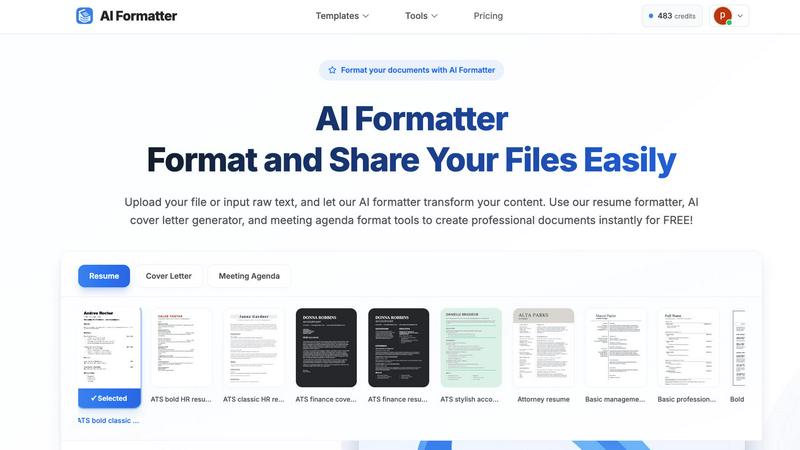
AI Formatter
Receipt Generator

Feature Comparison
AI Formatter
AI-Powered Instant Formatting
Harness advanced AI technology that analyzes your raw text or uploaded document and applies perfect professional formatting in seconds. The AI understands context and structure, intelligently organizing content into clean, visually appealing layouts without any manual effort. Simply upload or paste your text, and watch the transformation happen at lightning speed.
Vast ATS-Optimized Template Library
Access a curated collection of over 162 professional templates designed specifically to pass Automated Tracking Systems and impress recruiters. The library includes ATS-friendly resume formats, compelling cover letter designs, structured meeting agendas, professional invoices, and more, giving you a powerful head start on any document type.
Real-Time Collaborative Editor
Customize your AI-formatted document instantly with a powerful, intuitive online editor. Adjust fonts, colors, spacing, and layouts on the fly with real-time preview. This feature allows for complete personalization and fine-tuning, ensuring the final document matches your exact brand and style preferences without leaving the platform.
Multi-Format Export & Secure Sharing
Download your perfected documents in the formats you need most, including Word, PDF, and plain text. Share documents securely directly from the platform via shareable links. This versatility ensures compatibility with any application process or professional requirement, making distribution and collaboration efficient and hassle-free.
Receipt Generator
Extensive Template Library
With over 400 professionally designed templates, Receipt Generator covers a vast array of stores and restaurants. This wide selection ensures that you always have the perfect starting point for your receipt creation needs.
AI "Place in Scene" Feature
The unique AI "Place in Scene" feature allows users to create realistic images of receipts placed on any surface, such as a desk or counter. This eliminates the need for printing and enhances the visual context of your receipts for various uses.
Full Customization Options
Receipt Generator empowers users with complete control over every aspect of their receipts. Customize line items, prices, taxes, payment methods, and more to ensure your receipt meets your exact specifications.
Instant Download Capability
Experience the convenience of lightning-fast downloads with just one click. Export your finished receipt in high-resolution PNG or PDF formats without waiting, ensuring you can use your receipts immediately.
Use Cases
AI Formatter
Job Application Preparation
Job seekers can upload an existing resume or raw career history and use the AI resume formatter to create an ATS-optimized resume in under a minute. Simultaneously, the AI cover letter generator crafts a personalized, compelling cover letter, drastically speeding up application cycles and significantly improving interview callback rates with a 95%+ ATS pass guarantee.
Professional Meeting Management
Professionals can quickly transform scattered notes or bullet points into a clear, structured meeting agenda format. This ensures every meeting has a professional outline, defined objectives, and a timed schedule, promoting productivity and accountability. Share the formatted agenda instantly with all participants directly from the platform.
Business Document Creation
Entrepreneurs, freelancers, and small business owners can generate polished invoices, receipts, and proposals in seconds. Input client details and service data, and the AI invoice generator formats it into a clean, brand-consistent document ready for sending, streamlining billing and administrative tasks to save valuable time.
Academic and Report Formatting
Students, researchers, and academics can format essays, reports, and project documents to meet specific style guidelines quickly. By uploading a draft text file, the AI applies consistent headings, margins, citations, and layout, allowing the user to focus on content quality rather than tedious formatting rules.
Receipt Generator
Business Expense Tracking
Small business owners can utilize Receipt Generator to create accurate receipts for expense tracking and documentation. This helps in maintaining organized financial records and simplifies tax preparation.
Creative Projects and Mockups
Content creators can benefit from the AI "Place in Scene" feature to generate realistic receipts for social media posts, blogs, or video content. This adds a professional touch and elevates the quality of visual projects.
Inventory Documentation
Resellers can use Receipt Generator to document inventory purchases with authentic-looking receipts. This is essential for tracking expenses and managing stock effectively, ensuring a transparent operation.
Personal Use and Budgeting
Individuals can create receipts for personal budgeting. Whether it's tracking household expenses or documenting gifts, Receipt Generator makes it easy to keep financial records organized and accessible.
Overview
About AI Formatter
AI Formatter is a lightning-fast, cloud-based document formatting platform engineered to eliminate the tedious hours spent on manual document design. Developed by Sun Sky LLC, it leverages cutting-edge artificial intelligence to transform raw text or uploaded files—including Word documents, PDFs, and TXT files—into professionally polished documents in mere seconds. It’s the ultimate productivity tool for job seekers, professionals, businesses, and academics who need to present their best work instantly. The core value proposition is staggering speed paired with intelligent, ATS-optimized output. With a proven Applicant Tracking System pass rate of over 95%, it ensures your resume gets seen by human eyes. Choose from an extensive library of over 100 professionally designed templates for resumes, cover letters, meeting agendas, invoices, and more. The integrated real-time editor allows for complete customization of fonts, colors, and layouts. Finally, export or securely share your documents in multiple formats. Starting with free credits, AI Formatter streamlines document creation from start to finish, guaranteeing you save time and boost your professional impact with every interaction.
About Receipt Generator
Receipt Generator is the ultimate online tool for creating customized receipts in seconds. With over 400 store-specific templates ranging from Walmart and Starbucks to CVS and Best Buy, users can easily generate authentic-looking receipts tailored to their needs. Whether you're a small business owner, freelancer, content creator, or reseller, Receipt Generator provides the flexibility to edit every detail, including items, prices, dates, and payment methods, before instantly downloading high-resolution PNG files. No account is needed to get started, making it incredibly accessible for anyone. What truly sets Receipt Generator apart is its innovative AI "Place in Scene" feature, which allows users to generate photorealistic images of their receipts on various surfaces, enhancing their visual appeal for projects, documentation, or social media. With lightning-fast performance and a user-friendly interface, Receipt Generator has become the go-to tool for over 10,000 satisfied users worldwide.
Frequently Asked Questions
AI Formatter FAQ
What file formats does AI Formatter support for upload?
AI Formatter supports a wide range of common document formats for upload, including PDF, DOC, DOCX, and TXT files. This ensures you can start from almost any existing document. The maximum file size for uploads is 10MB, which is sufficient for most standard professional and academic documents.
How does the ATS optimization for resumes work?
The platform's templates and AI engine are specifically designed with Applicant Tracking System compatibility in mind. This includes using clean, parsable layouts, standard section headings, and optimized keyword placement. This design results in a documented pass rate of over 95%, meaning your resume's content is far more likely to be correctly read and ranked by automated screening software.
Can I edit the document after the AI formats it?
Absolutely. Once the AI completes its initial formatting, you have full access to a powerful real-time online editor. You can change text, customize fonts and colors, adjust spacing, and rearrange sections. This gives you complete creative control to fine-tune the AI-generated format to your exact specifications before downloading or sharing.
Is there a free plan to try AI Formatter?
Yes, AI Formatter offers a free starting tier that provides users with 10 free credits to explore the platform's core capabilities. This allows you to test the AI formatting on several documents, experiment with templates, and experience the speed and quality firsthand before choosing a paid plan that fits your needs.
Receipt Generator FAQ
Can I use Receipt Generator for personal use?
Yes, Receipt Generator is designed for legitimate business, creative, and personal use, allowing users to create customized receipts for various purposes.
Do I need to create an account to use the Receipt Generator?
No, you do not need to create an account to start using Receipt Generator. You can begin generating receipts immediately without any sign-up process.
How does the AI "Place in Scene" feature work?
The AI "Place in Scene" feature allows you to generate photorealistic images of your receipts placed on different surfaces, giving a realistic look without the need for printing.
What formats can I download my receipts in?
You can download your receipts in high-resolution PNG or PDF formats, ensuring you have the flexibility to use them as needed without compromising quality.
Alternatives
AI Formatter Alternatives
AI Formatter is a cloud-based productivity tool that transforms raw text into polished documents in seconds. It uses advanced AI and a vast template library to automate formatting for resumes, letters, and business documents, saving users significant time and effort. Users often seek alternatives for various reasons. Some need a different pricing model, more specialized features, or a platform that integrates with their existing workflow. Others may require offline access or have specific data security and privacy requirements that influence their choice. When evaluating alternatives, key factors to consider include core functionality, ease of use, and output quality. Assess the template selection, customization depth, and export options. Also, scrutinize the pricing transparency, security measures, and the tool's ability to handle your specific document types efficiently.
Receipt Generator Alternatives
Receipt Generator is a powerful online tool designed for creating custom receipts. It falls under the Productivity & Management category, offering users over 400 templates from well-known stores like Walmart and Starbucks. Many users seek alternatives to Receipt Generator for various reasons, such as pricing, specific features that may better suit their needs, or platform compatibility. When choosing an alternative, consider factors like ease of use, customization options, and whether the tool meets your particular requirements for generating receipts. When looking for a receipt generator alternative, prioritize tools that provide a wide selection of templates, flexibility in design, and quick download options. It's also important to assess the level of customer support and any additional features that can enhance your experience, such as AI capabilities or unique presentation options. A well-rounded alternative should cater to both individual and business needs effectively.